Module 1: R + Statistics Intro

PLS 206 — Applied Multivariate Modeling

Grey Monroe

UC Davis

2026-01-01

Part 1: Welcome to R

Why R?

Free & open source

Used by ecologists, geneticists, agronomists, and data scientists worldwide

10,000+ packages on CRAN for specialized analyses

Reproducible science

Your entire analysis is a script — share it, re-run it, tweak it

What we’ll use R for this quarter:

  • Linear & generalized linear models
  • GAMs, regularization, cross-validation
  • PCA, clustering, ordination
  • Random forests, neural nets
  • SEM, redundancy analysis

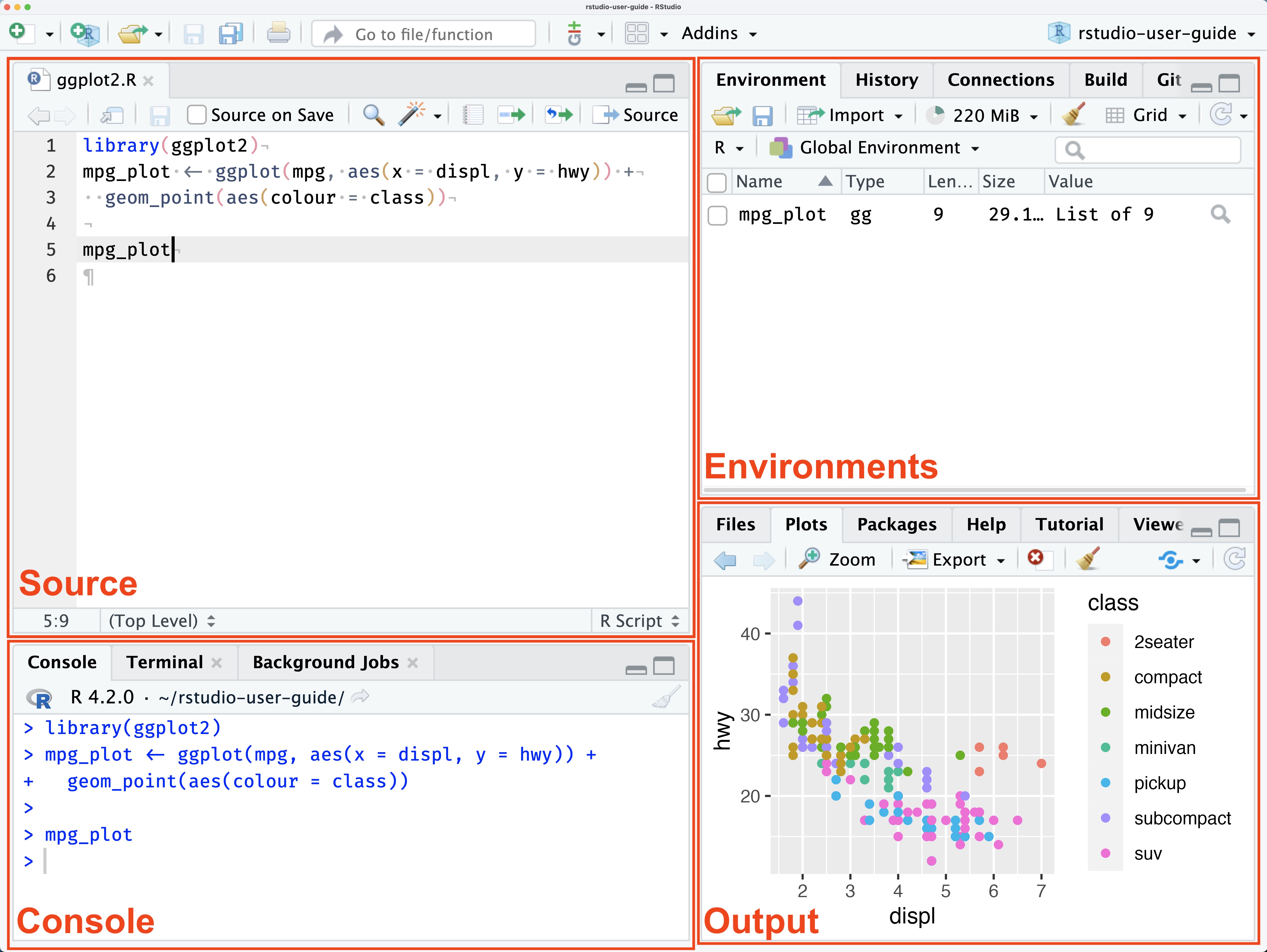
RStudio Orientation

Run code: Cmd+Enter (Mac) / Ctrl+Enter (Windows)
Your First R Objects

# Numeric
x <- 1
y <- 3.14
z <- 1e4        # scientific notation

# Math operations
x + y
[1] 4.14
(x + 1) * y    # follows PEMDAS
[1] 6.28
sqrt(y)
[1] 1.772005
log(y)
[1] 1.144223
y^2
[1] 9.8596

Note

Use <- for assignment. Use = only inside function arguments.

Data Types

# Numeric
x <- 42
class(x)
[1] "numeric"
# Character
w <- "hello"
class(w)
[1] "character"
# Logical
flag <- TRUE
class(flag)
[1] "logical"
# Boolean tests
myvar <- 10
myvar == 10     # TRUE
[1] TRUE
myvar > 2       # TRUE
[1] TRUE
myvar < 2       # FALSE
[1] FALSE

Vectors — the building block of R

numbers <- c(1, 2, 3, 4, 5, 10)
words   <- c("apple", "banana", "cherry", "grape")

class(numbers)
[1] "numeric"
class(words)
[1] "character"
# Sequences
10:20
 [1] 10 11 12 13 14 15 16 17 18 19 20
seq(from = 1, to = 100, by = 10)
 [1]  1 11 21 31 41 51 61 71 81 91

Vectors — operations & subsetting

numbers * 2                          # element-wise math
[1]  2  4  6  8 10 20
numbers[4:6]                         # index by position
[1]  4  5 10
words[2]
[1] "banana"
numbers[which(numbers > 3)]          # index by condition
[1]  4  5 10
numbers[numbers > 3]                 # shorthand
[1]  4  5 10
words %in% c("apple", "grape")       # membership test
[1]  TRUE FALSE FALSE  TRUE
words[words %in% c("apple", "grape")]
[1] "apple" "grape"

Vectors — useful extras

# NA values
x <- c(1, 2, NA, 4)
is.na(x)
[1] FALSE FALSE  TRUE FALSE
mean(x, na.rm = TRUE)
[1] 2.333333
# Factors (categorical variables)
fruits <- factor(c("apple", "banana", "apple", "cherry"))
levels(fruits)
[1] "apple"  "banana" "cherry"
table(fruits)
fruits
 apple banana cherry 
     2      1      1 

Lists & Data Frames

# Lists hold mixed types
my_list <- list(number = 42, word = "hello", flag = TRUE)
my_list$number
[1] 42
my_list[["word"]]
[1] "hello"
# Data frames = the workhorse for your data
df <- data.frame(
  rep   = c(1, 2, 3, 4),
  treat = c("A", "B", "A", "B"),
  value = c(10.2, 8.5, 11.1, 9.3)
)
str(df)
'data.frame':   4 obs. of  3 variables:
 $ rep  : num  1 2 3 4
 $ treat: chr  "A" "B" "A" "B"
 $ value: num  10.2 8.5 11.1 9.3

Working with Data Frames

df$value            # access a column
[1] 10.2  8.5 11.1  9.3
df[1, ]             # first row
  rep treat value
1   1     A  10.2
df[df$treat == "A", ]   # filter rows
  rep treat value
1   1     A  10.2
3   3     A  11.1
# Add a column
df$log_value <- log(df$value)

# Summary
summary(df)
      rep          treat               value          log_value    
 Min.   :1.00   Length:4           Min.   : 8.500   Min.   :2.140  
 1st Qu.:1.75   Class :character   1st Qu.: 9.100   1st Qu.:2.208  
 Median :2.50   Mode  :character   Median : 9.750   Median :2.276  
 Mean   :2.50                      Mean   : 9.775   Mean   :2.275  
 3rd Qu.:3.25                      3rd Qu.:10.425   3rd Qu.:2.344  
 Max.   :4.00                      Max.   :11.100   Max.   :2.407  

Reading Real Data

wine <- read.csv("winedata.csv")
str(wine)
'data.frame':   178 obs. of  14 variables:
 $ Cultivar      : chr  "barolo" "barolo" "barolo" "barolo" ...
 $ Alcohol       : num  14.2 13.2 13.2 14.4 13.2 ...
 $ AlcAsh        : num  15.6 11.2 18.6 16.8 21 15.2 14.6 17.6 14 16 ...
 $ Ash           : num  2.43 2.14 2.67 2.5 2.87 2.45 2.45 2.61 2.17 2.27 ...
 $ Color         : num  5.64 4.38 5.68 7.8 4.32 6.75 5.25 5.05 5.2 7.22 ...
 $ Flav          : num  3.06 2.76 3.24 3.49 2.69 3.39 2.52 2.51 2.98 3.15 ...
 $ Hue           : num  1.04 1.05 1.03 0.86 1.04 1.05 1.02 1.06 1.08 1.01 ...
 $ MalicAcid     : num  1.71 1.78 2.36 1.95 2.59 1.76 1.87 2.15 1.64 1.35 ...
 $ Mg            : int  127 100 101 113 118 112 96 121 97 98 ...
 $ NonFlavPhenols: num  0.28 0.26 0.3 0.24 0.39 0.34 0.3 0.31 0.29 0.22 ...
 $ OD            : num  3.92 3.4 3.17 3.45 2.93 2.85 3.58 3.58 2.85 3.55 ...
 $ Phenols       : num  2.8 2.65 2.8 3.85 2.8 3.27 2.5 2.6 2.8 2.98 ...
 $ Proa          : num  2.29 1.28 2.81 2.18 1.82 1.97 1.98 1.25 1.98 1.85 ...
 $ Proline       : int  1065 1050 1185 1480 735 1450 1290 1295 1045 1045 ...
head(wine)
  Cultivar Alcohol AlcAsh  Ash Color Flav  Hue MalicAcid  Mg NonFlavPhenols
1   barolo   14.23   15.6 2.43  5.64 3.06 1.04      1.71 127           0.28
2   barolo   13.20   11.2 2.14  4.38 2.76 1.05      1.78 100           0.26
3   barolo   13.16   18.6 2.67  5.68 3.24 1.03      2.36 101           0.30
4   barolo   14.37   16.8 2.50  7.80 3.49 0.86      1.95 113           0.24
5   barolo   13.24   21.0 2.87  4.32 2.69 1.04      2.59 118           0.39
6   barolo   14.20   15.2 2.45  6.75 3.39 1.05      1.76 112           0.34
    OD Phenols Proa Proline
1 3.92    2.80 2.29    1065
2 3.40    2.65 1.28    1050
3 3.17    2.80 2.81    1185
4 3.45    3.85 2.18    1480
5 2.93    2.80 1.82     735
6 2.85    3.27 1.97    1450

Tip

Always use str() after reading data — check that column types match what you expect.

Exploring the Iris Dataset

data(iris)
dim(iris)
[1] 150   5
summary(iris)
  Sepal.Length    Sepal.Width     Petal.Length    Petal.Width   
 Min.   :4.300   Min.   :2.000   Min.   :1.000   Min.   :0.100  
 1st Qu.:5.100   1st Qu.:2.800   1st Qu.:1.600   1st Qu.:0.300  
 Median :5.800   Median :3.000   Median :4.350   Median :1.300  
 Mean   :5.843   Mean   :3.057   Mean   :3.758   Mean   :1.199  
 3rd Qu.:6.400   3rd Qu.:3.300   3rd Qu.:5.100   3rd Qu.:1.800  
 Max.   :7.900   Max.   :4.400   Max.   :6.900   Max.   :2.500  
       Species  
 setosa    :50  
 versicolor:50  
 virginica :50  


Exploring Iris — plots

hist(iris$Sepal.Length,
     main = "Sepal Length",
     xlab = "mm",
     col = "steelblue")

plot(iris$Sepal.Length,
     iris$Petal.Length,
     xlab = "Sepal Length",
     ylab = "Petal Length")

Correlation

cor_result <- cor.test(iris$Sepal.Length, iris$Petal.Length)
cor_result

    Pearson's product-moment correlation

data:  iris$Sepal.Length and iris$Petal.Length
t = 21.646, df = 148, p-value < 2.2e-16
alternative hypothesis: true correlation is not equal to 0
95 percent confidence interval:
 0.8270363 0.9055080
sample estimates:
      cor 
0.8717538 

Save the result as an object and extract parts:

cor_result$estimate   # r
      cor 
0.8717538 
cor_result$p.value
[1] 1.038667e-47
cor_result$conf.int
[1] 0.8270363 0.9055080
attr(,"conf.level")
[1] 0.95

Part 1b: ggplot2

The Grammar of Graphics

ggplot2 builds plots layer by layer:

ggplot(data, aes(x = ..., y = ...)) +
  geom_*()   +    # geometry: points, lines, bars ...
  labs()     +    # labels
  theme_*()       # styling

Every plot starts with ggplot() — then add layers with +

Scatter Plot

library(ggplot2)

ggplot(iris, aes(x = Sepal.Length,
                 y = Sepal.Width)) +
  geom_point()

Add a Fit Line

ggplot(iris, aes(x = Sepal.Length,
                 y = Sepal.Width)) +
  geom_point() +
  geom_smooth(method = "lm")

Color by Group

ggplot(iris,
       aes(x = Sepal.Length,
           y = Sepal.Width,
           col = Species)) +
  geom_point() +
  geom_smooth(method = "lm")

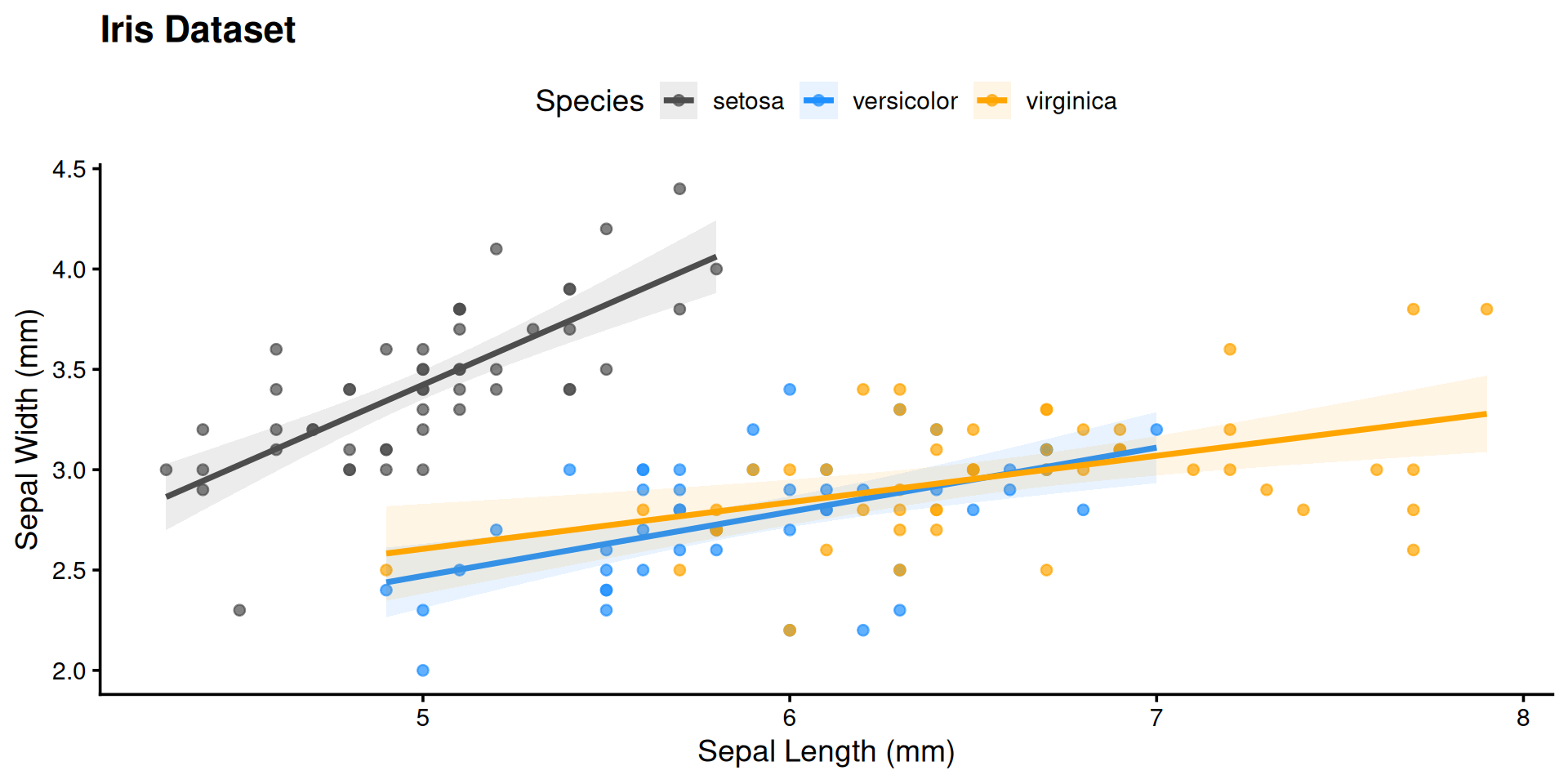
Publication-Ready Plot

ggplot(iris,
       aes(x = Sepal.Length,
           y = Sepal.Width,
           col = Species,
           fill = Species)) +
  geom_point(alpha = 0.7) +
  geom_smooth(method = "lm", alpha = 0.1) +
  labs(title = "Iris Dataset",
       x = "Sepal Length (mm)",
       y = "Sepal Width (mm)") +
  scale_color_manual(values = c("gray30", "dodgerblue", "orange")) +
  scale_fill_manual(values  = c("gray30", "dodgerblue", "orange")) +
  theme_classic(base_size = 14) +
  theme(plot.title   = element_text(face = "bold"),
        legend.position = "top")

Publication-Ready Plot

Part 2: Statistics Fundamentals

Descriptive Statistics

set.seed(42)
data("PlantGrowth")

tapply(PlantGrowth$weight,
       PlantGrowth$group,
       summary)
$ctrl
   Min. 1st Qu.  Median    Mean 3rd Qu.    Max. 
  4.170   4.550   5.155   5.032   5.293   6.110 

$trt1
   Min. 1st Qu.  Median    Mean 3rd Qu.    Max. 
  3.590   4.207   4.550   4.661   4.870   6.030 

$trt2
   Min. 1st Qu.  Median    Mean 3rd Qu.    Max. 
  4.920   5.268   5.435   5.526   5.735   6.310 
ggplot(PlantGrowth,
       aes(group, weight,
           fill = group)) +
  geom_boxplot(show.legend = FALSE,
               alpha = 0.7) +
  geom_jitter(width = 0.08,
              alpha = 0.5) +
  labs(x = "Treatment",
       y = "Weight (g)") +
  theme_classic()

One-Sample t-test

Does the control group mean differ from 5.0 g?

ctrl <- subset(PlantGrowth, group == "ctrl")$weight
t.test(ctrl, mu = 5)

    One Sample t-test

data:  ctrl
t = 0.17355, df = 9, p-value = 0.8661
alternative hypothesis: true mean is not equal to 5
95 percent confidence interval:
 4.614882 5.449118
sample estimates:
mean of x 
    5.032 

Non-parametric alternative:

wilcox.test(ctrl, mu = 5, conf.int = TRUE)

    Wilcoxon signed rank exact test

data:  ctrl
V = 28, p-value = 1
alternative hypothesis: true location is not equal to 5
95 percent confidence interval:
 4.57 5.38
sample estimates:
(pseudo)median 
          5.04 

Two-Sample t-test

x1 <- subset(PlantGrowth, group == "ctrl")$weight
x2 <- subset(PlantGrowth, group == "trt1")$weight

# Welch's t-test (default — allows unequal variances)
t.test(x1, x2)

    Welch Two Sample t-test

data:  x1 and x2
t = 1.1913, df = 16.524, p-value = 0.2504
alternative hypothesis: true difference in means is not equal to 0
95 percent confidence interval:
 -0.2875162  1.0295162
sample estimates:
mean of x mean of y 
    5.032     4.661 
# Mann-Whitney U (non-parametric)
wilcox.test(x1, x2, conf.int = TRUE)

    Wilcoxon rank sum test with continuity correction

data:  x1 and x2
W = 67.5, p-value = 0.1986
alternative hypothesis: true location shift is not equal to 0
95 percent confidence interval:
 -0.2899731  1.0100554
sample estimates:
difference in location 
             0.4213948 

Tip

Welch’s t-test is the safe default — it doesn’t assume equal variances.

One-Way ANOVA

Do all three treatment groups differ?

model <- aov(weight ~ group, data = PlantGrowth)
summary(model)
            Df Sum Sq Mean Sq F value Pr(>F)  
group        2  3.766  1.8832   4.846 0.0159 *
Residuals   27 10.492  0.3886                 
---
Signif. codes:  0 '***' 0.001 '**' 0.01 '*' 0.05 '.' 0.1 ' ' 1

Post-hoc pairwise comparisons:

TukeyHSD(model)
  Tukey multiple comparisons of means
    95% family-wise confidence level

Fit: aov(formula = weight ~ group, data = PlantGrowth)

$group
            diff        lwr       upr     p adj
trt1-ctrl -0.371 -1.0622161 0.3202161 0.3908711
trt2-ctrl  0.494 -0.1972161 1.1852161 0.1979960
trt2-trt1  0.865  0.1737839 1.5562161 0.0120064

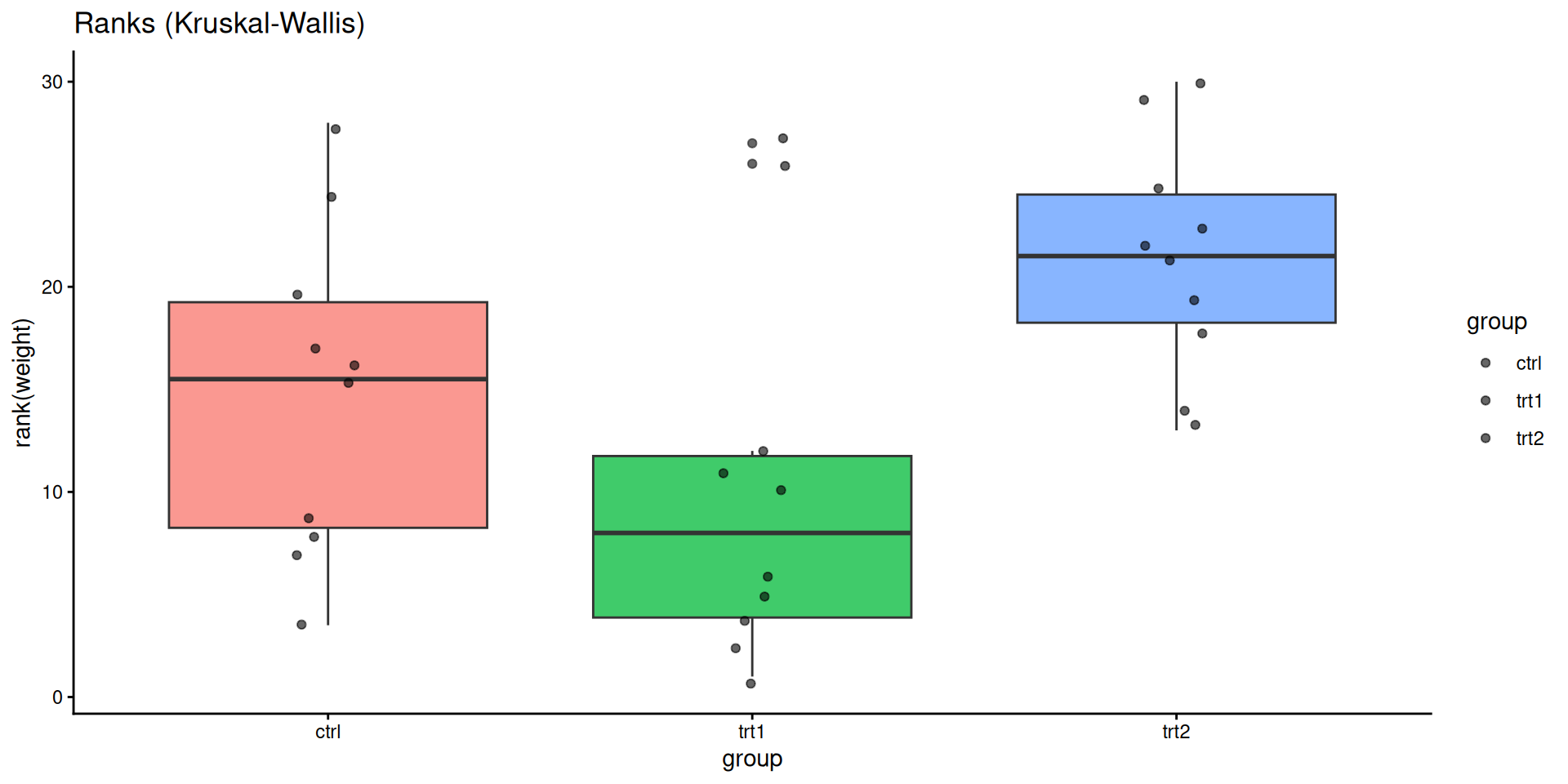
ANOVA vs Kruskal-Wallis

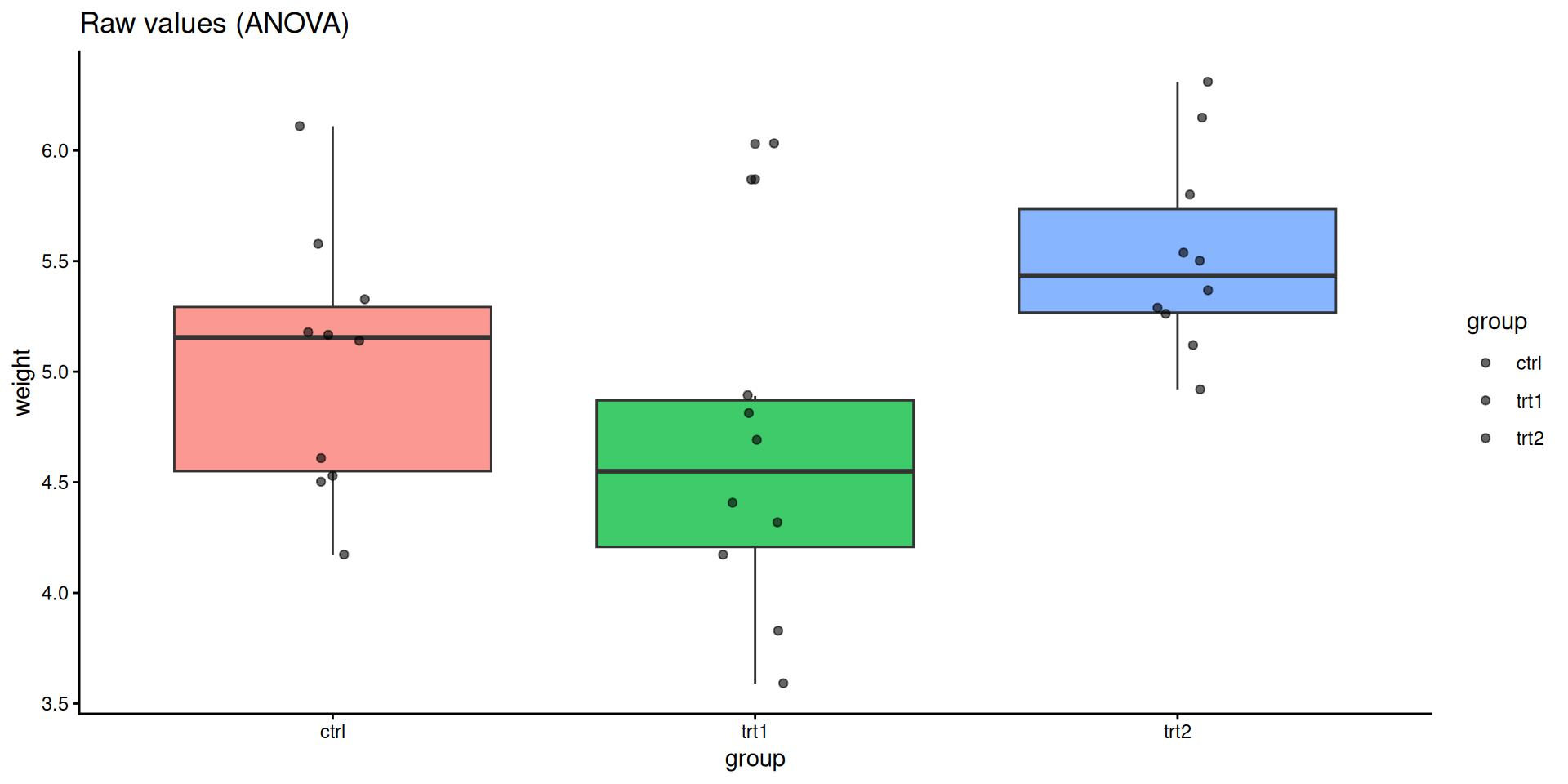
ggplot(PlantGrowth, aes(group, weight, fill = group)) +
  geom_boxplot(alpha = 0.75, show.legend = FALSE) +
  geom_jitter(width = 0.08, alpha = 0.6) +
  labs(title = "Raw values (ANOVA)") +
  theme_classic()
ggplot(PlantGrowth, aes(group, rank(weight), fill = group)) +
  geom_boxplot(alpha = 0.75, show.legend = FALSE) +
  geom_jitter(width = 0.08, alpha = 0.6) +
  labs(title = "Ranks (Kruskal-Wallis)") +
  theme_classic()
Kruskal-Wallis Test

kruskal.test(weight ~ group, data = PlantGrowth)

    Kruskal-Wallis rank sum test

data:  weight by group
Kruskal-Wallis chi-squared = 7.9882, df = 2, p-value = 0.01842

Pairwise follow-up with correction for multiple comparisons:

pairwise.wilcox.test(PlantGrowth$weight,
                     PlantGrowth$group,
                     p.adjust.method = "holm")

    Pairwise comparisons using Wilcoxon rank sum test with continuity correction 

data:  PlantGrowth$weight and PlantGrowth$group 

     ctrl  trt1 
trt1 0.199 -    
trt2 0.126 0.027

P value adjustment method: holm 

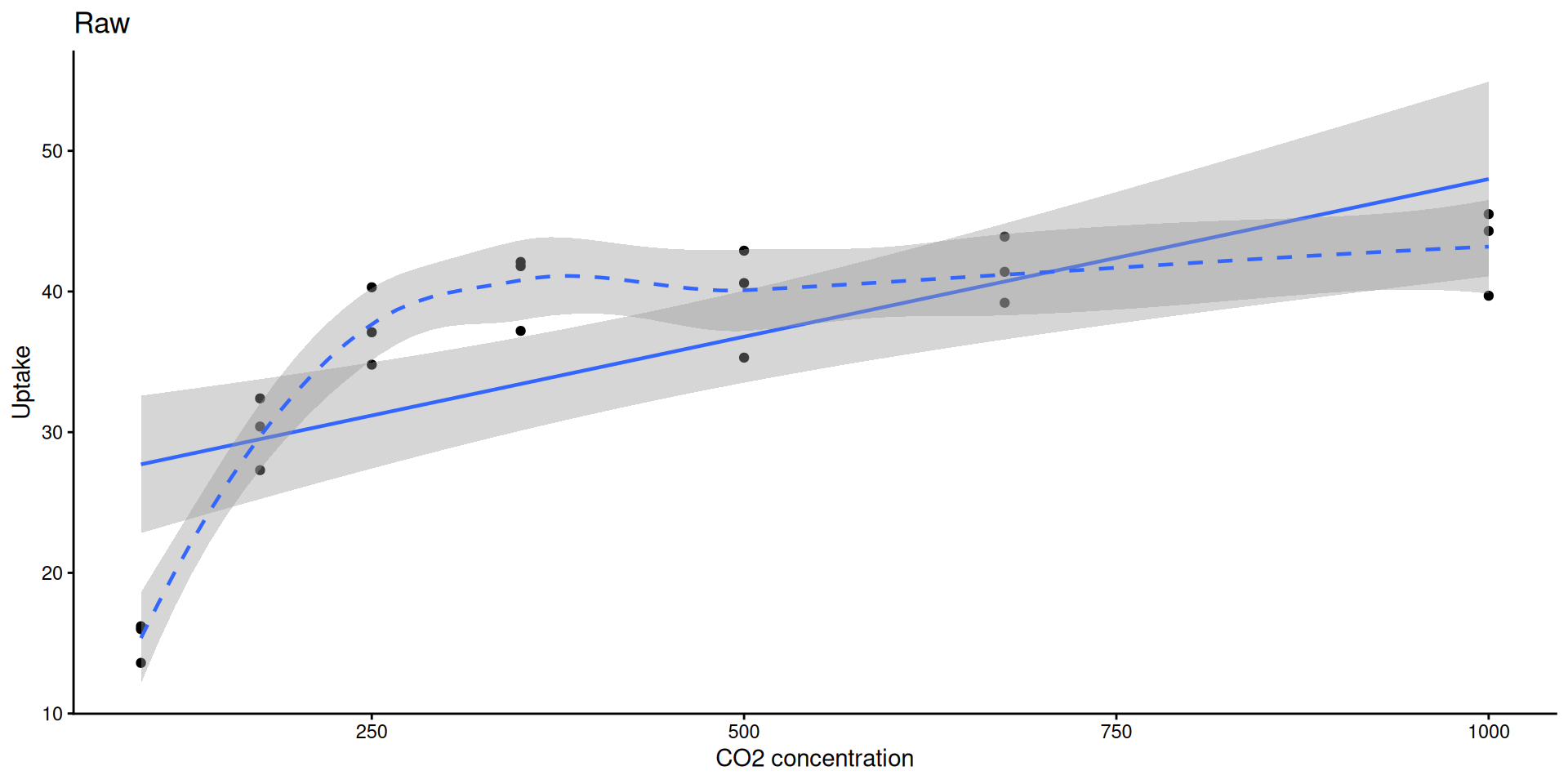
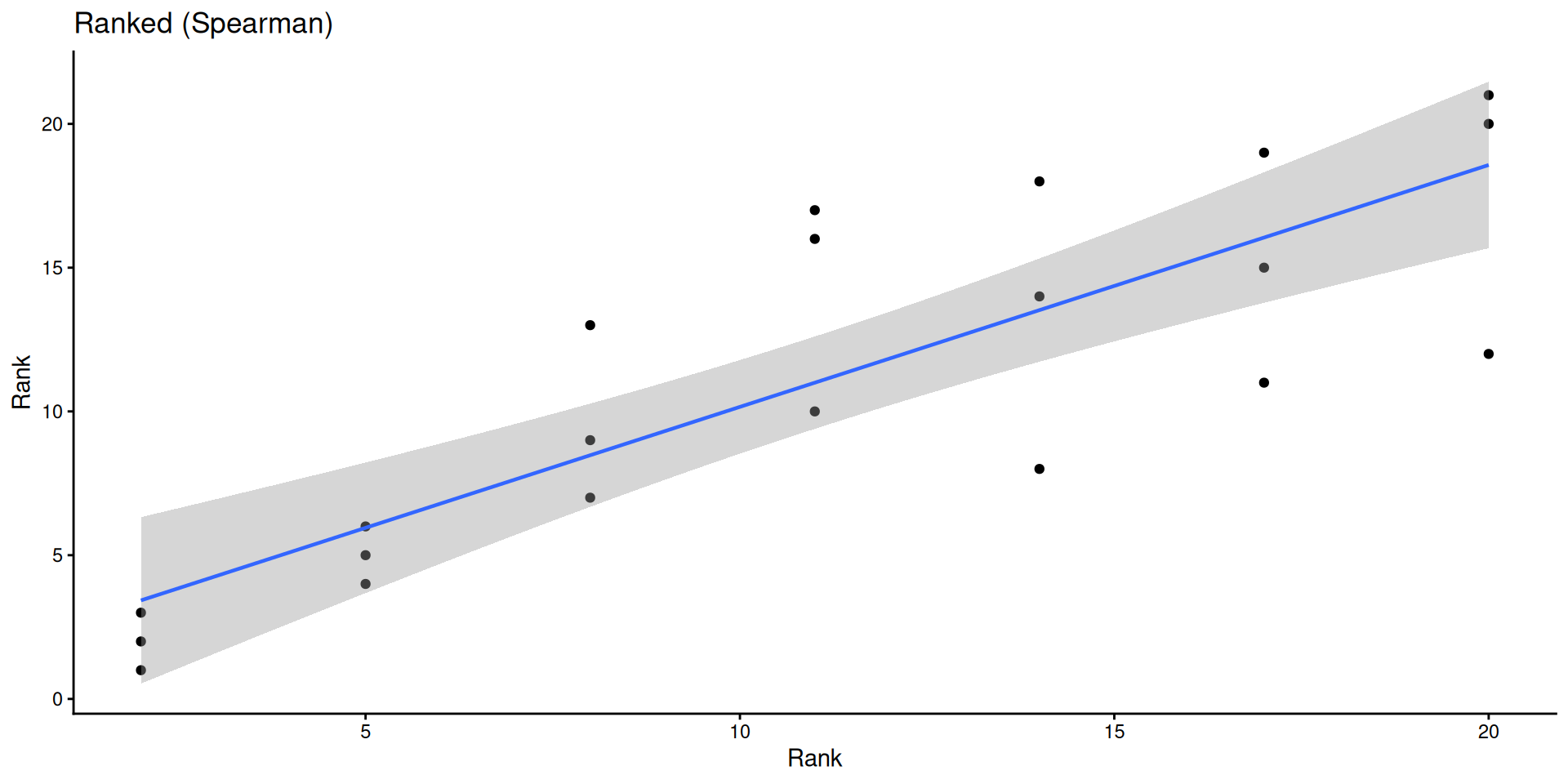
Pearson vs Spearman Correlation

data("CO2")
sub <- subset(CO2, Type == "Quebec" & Treatment == "nonchilled")

cor.test(sub$conc, sub$uptake, method = "pearson")

    Pearson's product-moment correlation

data:  sub$conc and sub$uptake
t = 4.3196, df = 19, p-value = 0.0003695
alternative hypothesis: true correlation is not equal to 0
95 percent confidence interval:
 0.3910239 0.8709363
sample estimates:
      cor 
0.7038936 
cor.test(sub$conc, sub$uptake, method = "spearman", exact = FALSE)

    Spearman's rank correlation rho

data:  sub$conc and sub$uptake
S = 256.28, p-value = 2.691e-06
alternative hypothesis: true rho is not equal to 0
sample estimates:
      rho 
0.8335869 

Correlation — Visualized

ggplot(sub, aes(conc, uptake)) +
  geom_point() +
  geom_smooth(method = "lm", linewidth = 0.8) +
  geom_smooth(method = "loess", linetype = 2, linewidth = 0.8) +
  labs(title = "Raw", x = "CO2 concentration", y = "Uptake") +
  theme_classic()
ggplot(sub, aes(rank(conc), rank(uptake))) +
  geom_point() +
  geom_smooth(method = "lm", linewidth = 0.8) +
  labs(title = "Ranked (Spearman)", x = "Rank", y = "Rank") +
  theme_classic()
Categorical Data — Fisher’s Exact & Chi-Squared

Is pest presence associated with treatment?

tab <- matrix(c(3, 17, 10, 10), nrow = 2, byrow = TRUE,
              dimnames = list(Pest = c("Present","Absent"),
                              Trt  = c("A","B")))
tab
         Trt
Pest       A  B
  Present  3 17
  Absent  10 10
fisher.test(tab)

    Fisher's Exact Test for Count Data

data:  tab
p-value = 0.04074
alternative hypothesis: true odds ratio is not equal to 1
95 percent confidence interval:
 0.02632766 0.94457354
sample estimates:
odds ratio 
  0.184812 
chisq.test(tab, correct = FALSE)

    Pearson's Chi-squared test

data:  tab
X-squared = 5.584, df = 1, p-value = 0.01812

Tip

Use Fisher’s exact for small cell counts (any cell < 5). Use chi-squared for larger samples.

Checking Normality

Always check your residuals, not the raw data:
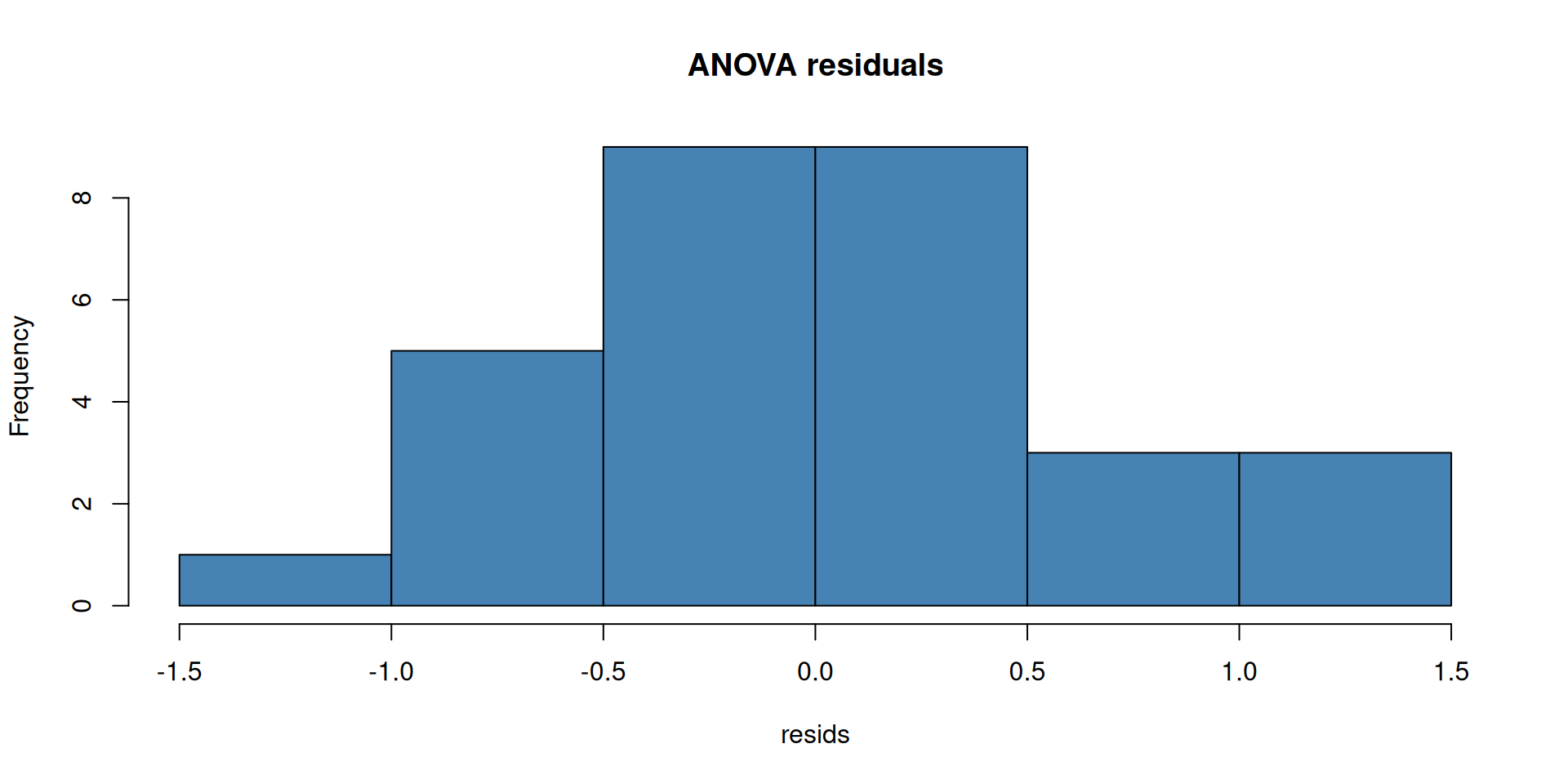
model <- aov(weight ~ group, data = PlantGrowth)
resids <- residuals(model)

hist(resids, main = "ANOVA residuals", col = "steelblue")
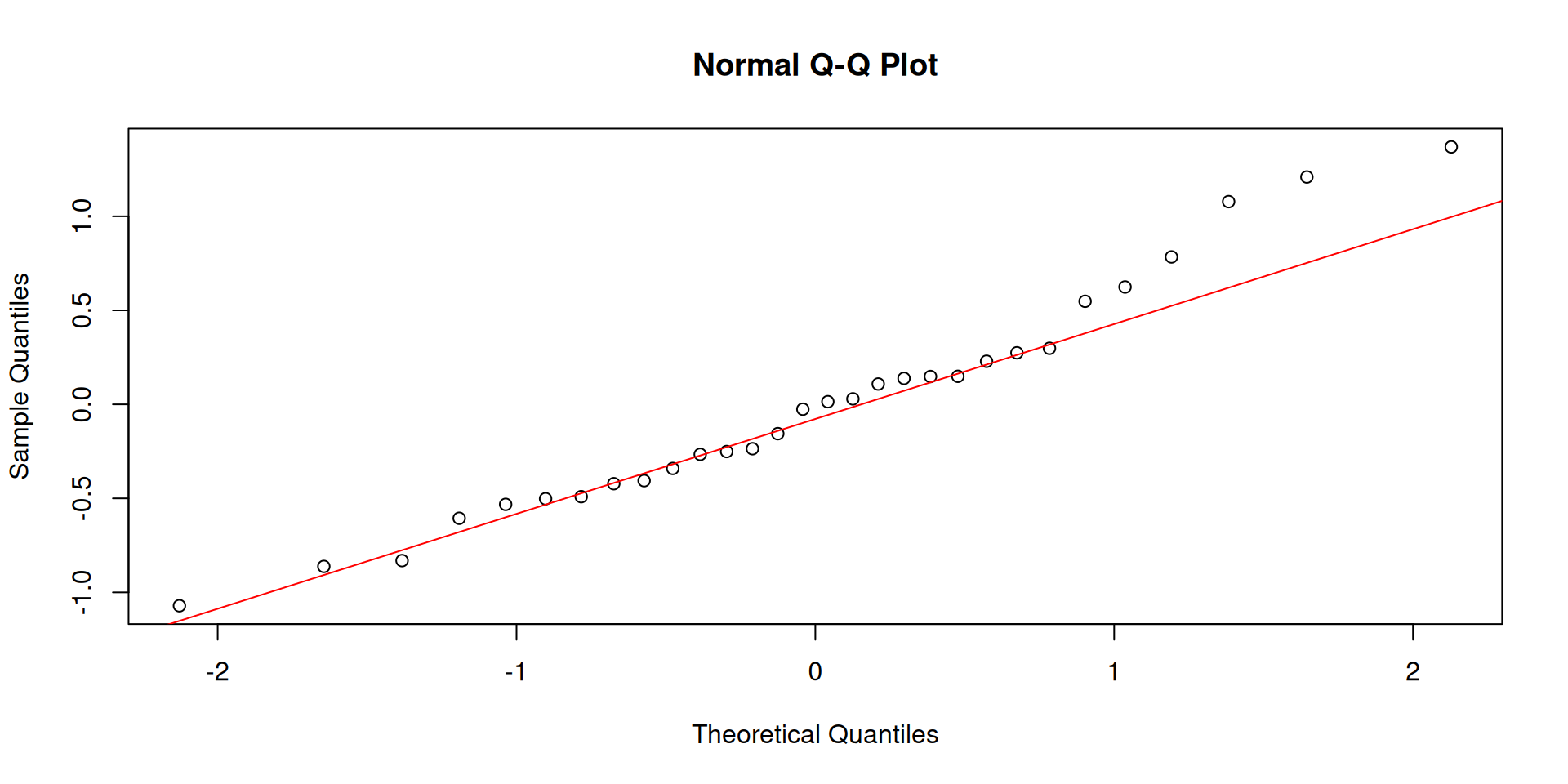
qqnorm(resids); qqline(resids, col = "red")

shapiro.test(resids)

    Shapiro-Wilk normality test

data:  resids
W = 0.96607, p-value = 0.4379

Interactive Explorers

Try it yourself

Open the interactive page to explore these concepts live — no R needed:

Module 1 Interactive Explorers →

  • Distribution Explorer: mean, SD, sample size
  • t-test Explorer: effect size, power, p-value
  • Correlation Explorer: Pearson vs Spearman, outlier sensitivity

Wrap-Up

Module 1 Summary

R foundations

  • Objects, vectors, data frames
  • Subsetting, filtering, transforming
  • Reading/writing data

Visualization

  • ggplot2: geom_point(), geom_smooth(), theme_classic()

Statistics

  • t-tests (one-sample, two-sample, paired)
  • ANOVA + TukeyHSD
  • Non-parametric alternatives (Wilcoxon, Kruskal-Wallis)
  • Pearson & Spearman correlation
  • Fisher’s exact & chi-squared

HW1 — Due next Wednesday

Submit on Canvas.

Topics: reading data, basic data manipulation, a t-test, a correlation, and a simple ggplot.

Questions? Office hours Wednesday 9–10 AM (Zoom).

R version 4.4.3 (2025-02-28)
Platform: x86_64-pc-linux-gnu
Running under: Ubuntu 24.04.3 LTS

Matrix products: default
BLAS:   /usr/lib/x86_64-linux-gnu/openblas-pthread/libblas.so.3 
LAPACK: /usr/lib/x86_64-linux-gnu/openblas-pthread/libopenblasp-r0.3.26.so;  LAPACK version 3.12.0

locale:
 [1] LC_CTYPE=C.UTF-8       LC_NUMERIC=C           LC_TIME=C.UTF-8       
 [4] LC_COLLATE=C.UTF-8     LC_MONETARY=C.UTF-8    LC_MESSAGES=C.UTF-8   
 [7] LC_PAPER=C.UTF-8       LC_NAME=C              LC_ADDRESS=C          
[10] LC_TELEPHONE=C         LC_MEASUREMENT=C.UTF-8 LC_IDENTIFICATION=C   

time zone: UTC
tzcode source: system (glibc)

attached base packages:
[1] stats     graphics  grDevices utils     datasets  methods   base     

other attached packages:
[1] ggplot2_4.0.2

loaded via a namespace (and not attached):
 [1] vctrs_0.7.1        nlme_3.1-167       cli_3.6.5          knitr_1.51        
 [5] rlang_1.1.7        xfun_0.56          otel_0.2.0         generics_0.1.4    
 [9] S7_0.2.1           jsonlite_2.0.0     labeling_0.4.3     glue_1.8.0        
[13] htmltools_0.5.9    scales_1.4.0       rmarkdown_2.30     grid_4.4.3        
[17] tibble_3.3.1       evaluate_1.0.5     fastmap_1.2.0      yaml_2.3.12       
[21] lifecycle_1.0.5    compiler_4.4.3     dplyr_1.2.0        RColorBrewer_1.1-3
[25] pkgconfig_2.0.3    mgcv_1.9-1         lattice_0.22-6     farver_2.1.2      
[29] digest_0.6.39      R6_2.6.1           tidyselect_1.2.1   splines_4.4.3     
[33] pillar_1.11.1      magrittr_2.0.4     Matrix_1.7-2       withr_3.0.2       
[37] tools_4.4.3        gtable_0.3.6